

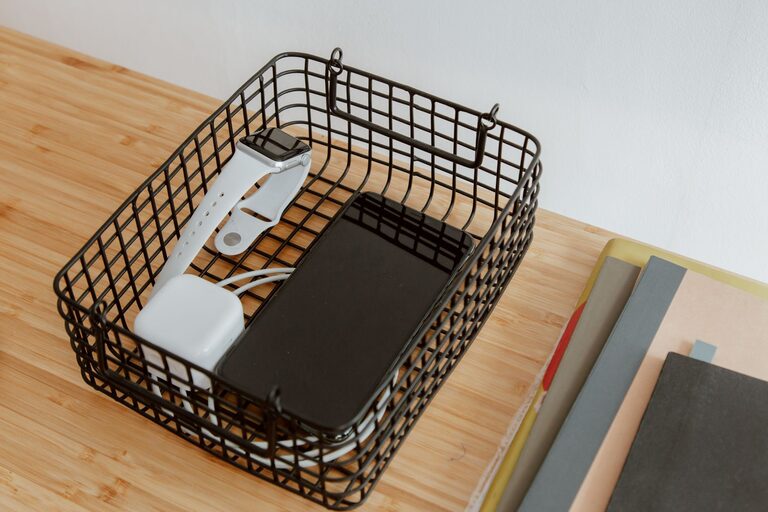
A dedicated charging station can make everyday routines easier. Instead of searching for loose cables or using every available outlet, you can keep phones, tablets, watches, headphones, and other devices in one organized place.
The best charging station is convenient, easy to use, and safe. It does not need to be expensive or complicated. With a suitable location, reliable chargers, and simple cable management, you can create a setup that works for your household.
Choose the Right Location
Start by choosing a location that is easy to reach but does not create clutter. Common options include a desk, entryway table, kitchen counter, nightstand, or shelf.
Consider these factors:
– Access to a wall outlet: The station should be close enough to power without requiring long extension cords.
– A flat, stable surface: Devices should rest securely while charging.
– Good airflow: Avoid enclosed spaces where chargers and devices may become warm.
– Low traffic: Choose a spot where cables will not become a tripping hazard.
– Convenience: Place the station where you naturally set down your devices.
Keep the charging area away from sinks, drink containers, heaters, and direct sunlight. Moisture and excess heat can damage electronics and create safety risks.
Decide Which Devices to Include
Make a list of the devices that need regular charging. This helps you select the right number and type of ports.
Your list may include:
– Smartphones
– Tablets and e-readers
– Smartwatches
– Wireless earbuds
– Cameras
– Game controllers
– Portable speakers
– Fitness trackers
– Rechargeable batteries
You may not need to charge every item at the same time. If only a few devices are used daily, a small charging station may be enough. For families or shared spaces, choose a setup with extra ports and room for multiple devices.
Separate daily-use devices from items that are charged less often. Keeping occasional devices in a nearby drawer can help prevent the main station from becoming overcrowded.
Select a Power Setup
Most charging stations use either a multiport wall charger, a power strip, or a charging dock with built-in ports.
Multiport Wall Charger
A multiport charger plugs directly into the wall and provides several charging ports. This option is compact and reduces the number of separate power adapters.
When choosing one, check:
– The number of ports
– The port types
– The total power output
– Compatibility with your devices
– Safety certifications from a recognized testing organization
A charger with a mix of common ports can support different cables. Some newer devices may use USB-C, while older accessories may use other connectors.
Power Strip
A power strip can support chargers for devices that use separate adapters. Choose a model with enough space between outlets so bulky adapters do not block one another.
Look for features such as:
– Overload protection
– A sturdy power cord
– A clear power switch
– Safety certification
– A suitable number of outlets
Avoid connecting one power strip to another. This practice can overload the circuit and create unnecessary safety risks.
Charging Dock
A charging dock provides designated spaces for devices and often includes built-in cable channels. It can be useful on a nightstand or shared family table.
Before buying a dock, confirm that it supports your devices and cases. Some docks only work with certain connectors or may not leave enough room for protective cases.
Plan the Cable Layout
Cables are usually the main source of charging-station clutter. A simple layout can make the station easier to use and maintain.
Begin by placing the power source at the back or side of the station. Route each cable toward the location where the device will rest. Leave enough length for comfortable use, but avoid excess cable lying across the surface.
Helpful cable-management tools include:
– Adhesive cable clips
– Velcro straps
– Cable sleeves
– Small cable labels
– A cable box
– A tray with openings
– Reusable ties
Label cables by device or connector type. This is especially useful when several cables look similar. Use removable labels or small tags so cables can be replaced without rebuilding the entire setup.
Keep cables away from sharp edges and avoid tightly bending them near the connector. A gentle curve helps reduce wear over time.
Create Dedicated Device Spaces
Give each frequently charged device a specific place. Small stands, baskets, or dividers can keep devices upright and prevent them from being stacked on top of one another.
A good arrangement might include:
– A stand for phones
– A larger section for tablets
– A small tray for earbuds and watches
– A separate area for charging accessories
– A nearby drawer for spare cables
If children use the charging station, choose a lower location that is easy to reach and leave enough space for larger devices. For a shared household station, label sections by person or device type.
Do not place devices where they can fall from the surface. A stand with a broad base or a tray with raised edges can help keep them secure.
Check Heat and Ventilation
Chargers and devices can become warm during use. Mild warmth is common, but excessive heat may indicate a problem with the charger, cable, device, or power setup.
To improve airflow:
– Do not cover chargers with clothing or papers.
– Avoid placing chargers under pillows or blankets.
– Leave space around power adapters.
– Do not pack devices tightly together.
– Keep the station away from heaters and hot appliances.
– Check that vents on electronics are not blocked.
If a charger or cable becomes unusually hot, smells unusual, makes noise, or shows visible damage, unplug it and stop using it. Replace damaged accessories with compatible, reliable products.
Add Simple Safety Features
Safety should be part of the design from the beginning. Use chargers and cables that are designed for your devices and follow the manufacturer’s instructions.
Keep these guidelines in mind:
– Use undamaged cables and adapters.
– Avoid forcing a connector into a port.
– Keep liquids away from the charging area.
– Do not overload outlets or power strips.
– Unplug accessories that are damaged or no longer needed.
– Keep the station clear of loose paper, fabric, and other easily moved items.
– Inspect cables periodically for fraying or bent connectors.
A timer or smart outlet may be useful for certain accessories, but it should not replace basic safety practices. Make sure any added device is compatible with the charger and intended for the type of use.
Test the Station
Once everything is arranged, test the station with each device.
Check that:
- Every cable reaches its intended device.
- Each device begins charging normally.
- Chargers remain stable and do not become excessively hot.
- Cables do not pull devices off the surface.
- Nothing blocks nearby outlets or switches.
- The station can be used without unplugging other important equipment.
Try using the station during a normal evening or morning routine. If you need to move cables, reach around objects, or search for connectors, adjust the layout before making it permanent.
Maintain the Charging Station
A charging station works best when it receives occasional attention. Once a month, remove unused cables and wipe dust from the surface. Check for frayed wires, loose connectors, or adapters that no longer work properly.
When replacing a device, review whether its cable still belongs at the station. Store spare accessories separately and recycle old electronics through an appropriate local program when possible.
A well-planned charging station does more than organize cables. It creates a reliable place for everyday devices, reduces countertop clutter, and makes charging part of a simple routine. Start with the devices you use most, choose quality power accessories, and adjust the layout as your needs change.