

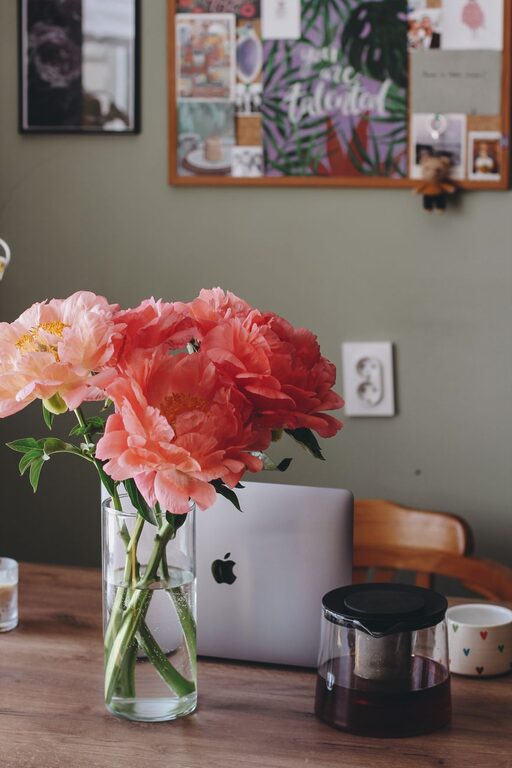
A home workspace should help you feel focused without making you feel tense. Whether you work from a dedicated office, a bedroom corner, or part of a shared living area, a few thoughtful changes can make the space more comfortable and peaceful.
Creating a relaxing workspace does not require a complete renovation or expensive furniture. The most important steps are to reduce distractions, improve comfort, and add details that make the area feel welcoming. Use the ideas below to create a workspace that supports both concentration and calm.
Start With a Simple Plan
Before moving furniture or buying accessories, think about how you use your workspace each day. Consider the tasks you complete, the equipment you need, and the times when the room feels most comfortable.
Ask yourself:
– Do you need space for a computer, notebook, or paperwork?
– Is the area too bright, too dark, or noisy?
– Which items must stay within reach?
– What usually distracts you?
– Do you need room to stretch or move during breaks?
A short plan can help you avoid clutter and make better choices. Focus on improving the features that affect your daily comfort rather than trying to copy a picture-perfect office.
Choose a Comfortable Layout
The position of your desk can influence how relaxed the room feels. If possible, place the desk near a window so you can enjoy natural light and look outside during short breaks. Avoid positioning the screen where direct sunlight creates glare.
Leave enough space around the desk to move your chair easily and stand up without bumping into furniture. A clear path makes the room feel more open, even when the workspace is small.
If your workspace is in a shared room, use a small rug, bookcase, or folding screen to define the area. This creates a visual boundary between work and rest without requiring a separate room.
Keep Frequently Used Items Close
Place your keyboard, notebook, water bottle, and other daily essentials where you can reach them comfortably. Items used less often can go in a drawer, cabinet, or nearby storage box.
A useful rule is to keep the desktop clear enough for your main task. A clean surface makes it easier to begin work and reduces the feeling that unfinished tasks are everywhere.
Improve Lighting
Good lighting can make a workspace feel more inviting and help reduce eye strain caused by a dim or uneven room. Use a combination of natural light, general room lighting, and a focused desk lamp.
A desk lamp with an adjustable arm allows you to direct light where you need it. If you write by hand, place the lamp on the opposite side of your writing hand to reduce shadows. For computer work, position the light so it does not reflect directly on the screen.
Soft, warm lighting can make the room feel calm at the end of the day. During work hours, choose lighting that is bright enough to see clearly without feeling harsh. Dimmable bulbs are useful because they allow you to adjust the atmosphere as your schedule changes.
Select Supportive Furniture
Comfortable furniture is one of the most important parts of a relaxing workspace. Choose a desk that gives you enough room for your equipment without taking over the entire room.
Your chair should support an upright, natural sitting position. Adjust the height so your feet rest comfortably on the floor and your arms can reach the desk without lifting your shoulders. If your chair does not provide enough support, a cushion or small footrest may improve comfort.
You can also change positions throughout the day by using a monitor stand, laptop riser, or adjustable desk. Even small adjustments can help prevent stiffness and make long work periods feel easier.
Pay Attention to Screen Placement
Place your monitor directly in front of you rather than far to one side. The top of the screen should be near eye level, allowing you to look ahead without constantly bending your neck.
Keep the screen at a comfortable distance and adjust its brightness to match the room. Taking regular visual breaks is also helpful. Every so often, look away from the screen and focus on something farther across the room.
Use Calm Colors and Natural Materials
Color can change the mood of a room. Soft neutrals, gentle greens, muted blues, and warm earth tones often create a calm background. You do not need to repaint the entire room; a small change such as a desk mat, curtain, artwork, or cushion can make a difference.
Natural materials can also make a workspace feel more welcoming. Consider adding:
– A wooden tray or pencil holder
– A woven basket for supplies
– A cotton or wool cushion
– A small ceramic container
– A plant or vase with fresh branches
Choose a few pieces that you genuinely enjoy. Too many decorative items can create visual clutter and make the workspace less restful.
Add a Small Touch of Nature
Plants can bring color and life to a workspace. Select a variety that suits the amount of light available and the level of care you prefer. If your room has limited natural light, a low-maintenance plant or a simple artificial plant may be a practical option.
You can also connect the workspace with nature by placing it near a window, using natural textures, or displaying a landscape print. These small details can help the area feel less enclosed.
Reduce Noise and Digital Distractions
Sound can have a major effect on concentration. If the room is noisy, try a soft rug, curtains, or fabric wall decorations to help make the space feel quieter. Closing a door or using a room divider may also reduce interruptions.
Keep digital distractions under control by organizing your computer desktop, silencing unnecessary notifications, and placing your phone out of immediate reach when you need focused time.
Create a simple system for managing cords as well. Cable clips, ties, and a small box can prevent wires from spreading across the desk and floor. A tidy cable setup makes the workspace look calmer and easier to clean.
Organize Without Overfilling
Storage should make it easier to find what you need, not encourage you to keep everything nearby. Use drawers, labeled boxes, shelves, or a small rolling cart to group similar items together.
Try these organizing habits:
– Keep only current projects on the desktop.
– Store extra paper and supplies in one designated place.
– Use a tray for incoming documents.
– Review unused items once a month.
– Return tools to their storage spot after use.
A short reset at the end of the day can prevent clutter from building up. Spend five minutes clearing the surface, closing open tasks, and preparing the items you will need tomorrow.
Create a Relaxing Work Routine
A peaceful workspace works best when paired with calm habits. Begin the day by opening a window, adjusting the lighting, or making a warm drink. These small actions can signal that it is time to settle into your work.
Take regular breaks to stand, stretch, refill your water, or look outside. You do not need a complicated schedule. A few minutes away from the desk can help you return with a clearer mind.
At the end of the workday, create a simple closing routine. Save your files, write down unfinished tasks, and put away loose items. If possible, turn off work-related notifications and leave the workspace for a different room or activity.
Make the Space Feel Like Yours
The most relaxing workspace is one that reflects your preferences. Add a framed photograph, a favorite piece of art, or an object with personal meaning. Keep the design practical, but allow the area to feel warm and individual.
Start with one or two changes rather than trying to transform everything at once. Improve the lighting, clear the desktop, or add a comfortable chair. Over time, notice what helps you feel focused and at ease, then adjust the space accordingly.
A relaxing home workspace is not about perfection. It is about creating a comfortable environment where you can work with fewer distractions and finish the day feeling more settled.